How to integrate your card payments with the DentalPlus software.
Sign up with Dojo, connect a card machine to DentalPlus and take payments in seconds. It is quick, simple, and secure.
- Dojo with DentalPlus boosts practice efficiency
- Offer patients a range of secure payment options
- Cutting down on time-consuming admin
There are three simple steps:
¶ Step 1: Signing up with Dojo
To sign up with Dojo, Click here…
.png)
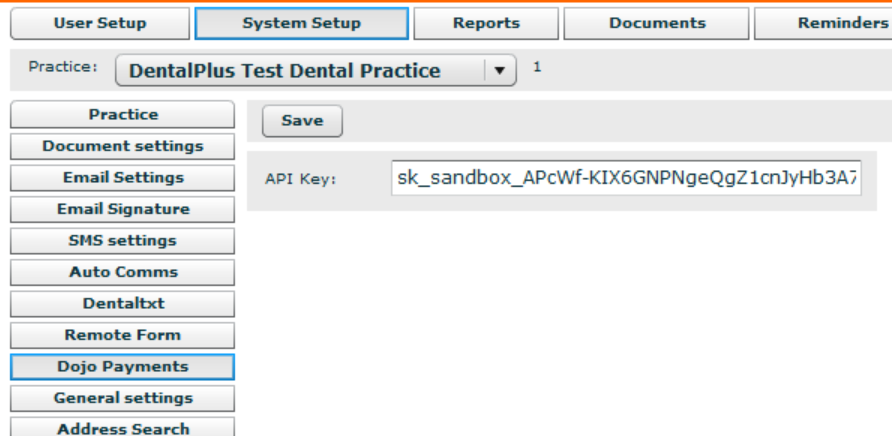
¶ Step 2: API Keys
Once you have created your Dojo account, you'll need to generate an API key and copy it to the DentalPlus admin section. Contact the Dojo integration team with your customer reference number and terminal ID to receive an email with your integration details.
More information is available in the Dojo documentation..
¶ Step 3: Adding a card machine
To use a Dojo terminal linked to DentalPlus, please see the instructions for switching on integrated payments for your Dojo card machine:
- On the card machine, tap the three bars on the top left of the screen.
- Select the ‘Settings’ cog on the bottom left of the screen.
- Select 'Payments' and enter your supervisor code; you will now be able to enable the two integrated modes, 'Pay at Counter' and 'Pay at Table'
If you wish to take a future payment directly from the terminal
- Touch the three lines at the top left of the terminal display
- Select ‘Settings’
- Choose ‘Non-integrated payments’ and enable this option
For more information, please refer to the Dojo help documentation by clicking here.
¶ Taking payments
Everything is now ready. Accept deposits and outstanding balance payments from patients with ease, and provide them with the safe payment methods that most meet their needs.
In the patient's financial section
1) Click ‘Take payment’
2) Choose a card as a method
3) Select a terminal from the list
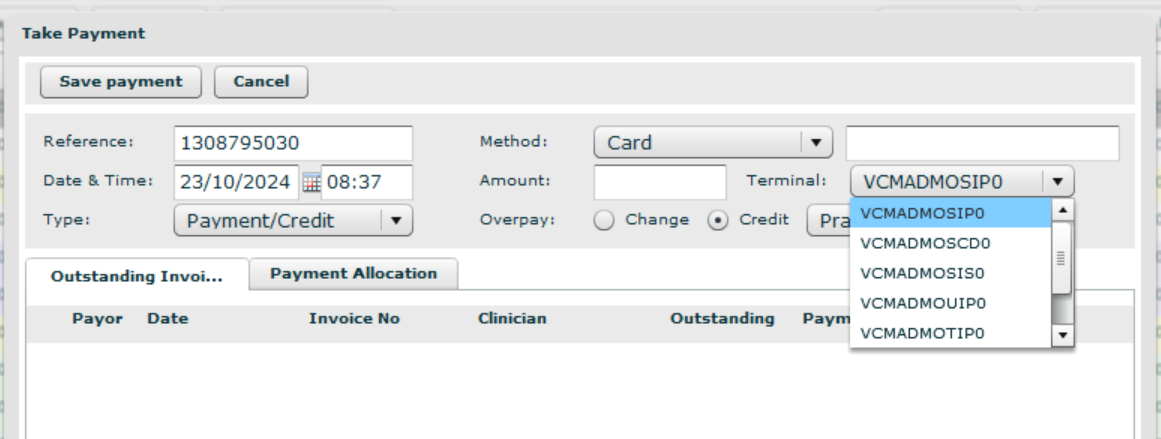
4) Once you enter the payment amount and click Save payment, the terminal will activate and request the card to be entered/touched.
If the payment fails for any reason, the terminal will display relevant messages, and the transaction will not be recorded on DentalPlus.
If you don't want to use a card machine for the card payment, choose “-” at the bottom of the list.