¶ How to add NHS scheme details
NHS scheme settings can be placed through the admin section of DentalPlus.
Go to the Admin -> System Setup -> Practice -> NHS Settings
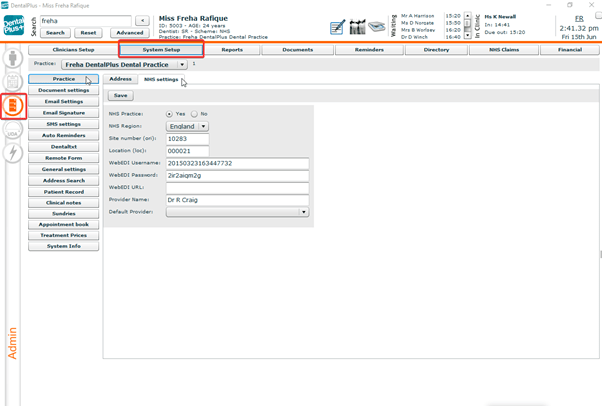
- Tick ‘Yes’ in the ‘ NHS Practice’
- Select the region in the drop-down
- Add Site number that can be found in the practice documents
- Add Location
- Add WebEDI credentials that will be found in the Compass account
- Add Provider
¶ How to add NHS clinician
NHS settings of clinicians can be placed through the admin section of DentalPlus.
Go to the Admin → User Setup→ User →NHS Setup
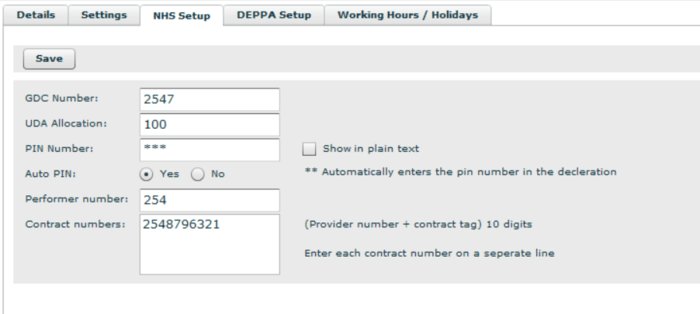
1. GDC is the registration number that is shown on the certificate of registration for a Dentist
2. UDA Allocation is a number used for the UDA meter to monitor how many UDAs were done
3. PIN, Performer, and Contract can be found in the Compass account
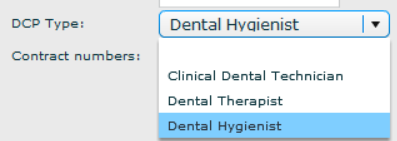
4. Choose a clinician type and leave blank for dentists
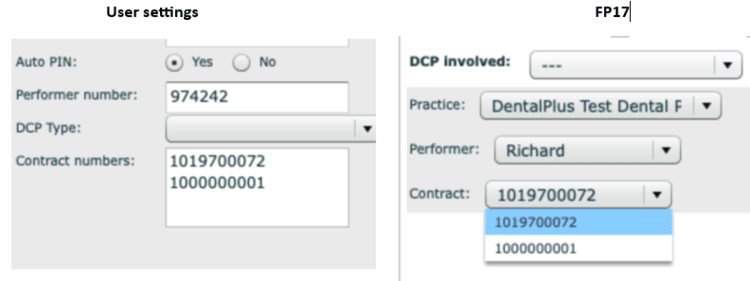
Adding a new contract: If the clinician has a few contracts, they should be added on separate lines to create two entries in the drop-down box.