¶ Send Claims
After submitting all FP17 claims appear in the ‘ Send Calims’ section that can be found in Admin→ NHS claims → Send Claims
All the claims ready to send are gathered in a specific batch. When you decide to send a batch just click on the ‘Send Now’ button.

¶ Claims on hold
In DentalPlus you can put claims on hold before sending them to the board
A claim could need to be put on hold for a few reasons:
- Clinicians may want to add more treatments to the claim before sending them off.
- A treatment could be ongoing for the patient which can result in the claim being put on hold.
- How to put claim on hold….
- In the ‘Send Claims’ click on the claim to highlight it. ( Hold the Ctrl/Shift button to highlight a few)
- Click on the ‘Move to hold’ button
- This will move the claim to the claims on hold section

2. How to move the claim back to the batch….
- In the ‘Move to Hold’ tab click on the claim to highlight it. ( Hold the Ctrl/Shift button to highlight a few)
- Click on the ‘Move to batch’ button
- This will move the claim back

¶ Acknowledgements
Acknowledgements section is where all the claims end up.
There are 3 steps to this section.
- An error message can occur as soon as the claim has been sent
If there is an error message pops up when you first send off the claim, check if the postcode has been entered properly.
- The board have accepted the claim but has sent it back.
There could be a problem with the treatment plan.
- Then the last stage is when the claim goes back into the schedule.

¶ Schedules
The schedule column shows the status of the claims and lets you know what's happening to them. It also gives you a list of what is coming back once a month. This should happen in the 20th of each month

Schedules statuses:
- White claim is sent claims - a response will come back a day later.
- Blue claim is the expected claim: if there is a problem with it it will turn blue.
- Green claim means confirmation is done and claims have been sent,
- Red means issue it got a negative instead of a positive and has had 3 comments
The schedule column displays the claim batch number.
FP17 ID Number is a claim number that has been sent.
Clinician . The name of the clinician the work was carried out by.
Patient field shows if the patient pays for treatment or is exempt.
The comment section shows the following
- UDA Band . What charge its will be gone through : band 1= 1 UDA , Band 2= 3 UDA or Band 3= 12 UDA
- Status: positive / error
- If the patient is on any exemption for example Tax credit, Job seekers, etc
¶ Sent claims
The ‘Sent Claim’ tab contains all claims that were sent earlier. It consists of the data per batch such as ID, Date, patient and clinician name, band, category and count

Claim colours:
- Claims turn blue about 24 hours after they are sent, and the DAILYS report is received from Compass.
- They become green when the monthly schedules return.
¶ Problem claims
1) Some NHS claims may have been returned with an error.
2) These claims can be found in Admin > NHS Claims > Problem Claims.
3) Clicking the black arrow on the left side expands the explanation.
4) Read this explanation and make the relevant changes to the course of treatment
5) Submit this claim as initial

¶ How to find previous claims?
- Location: Admin section→ NHS → Sent claims
- The list of batches is on the left-hand side.
- Double-clicking on the batch displays all claims that were sent under this batch.

¶ UDA Tracker
UDA Tracker gathers the data of all UDAs that have been sent in the last year
You can track the UDAS from last year as well as the current year.
Location: DentalPlus Home → UDA section

A pop-up window will appear showing the UDAS

Claimed = Claims sent
Total of claims =Total Running of claims
Confirmed= Back on the schedule
Expected = Daily’s back but no schedule
No Reply = Neither daily or the schedule is back. (Maybe error in the claim and that’s why it hasn’t been sent off)

Claim colours:
- Confirmed = Green
- Expected = Blue
- Red = Claimed

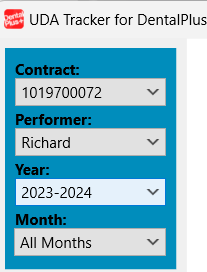
You can search UDA per contract, performer, and year.
¶ NHS reports
Five main NHS reports can be generated in DentalPlus.
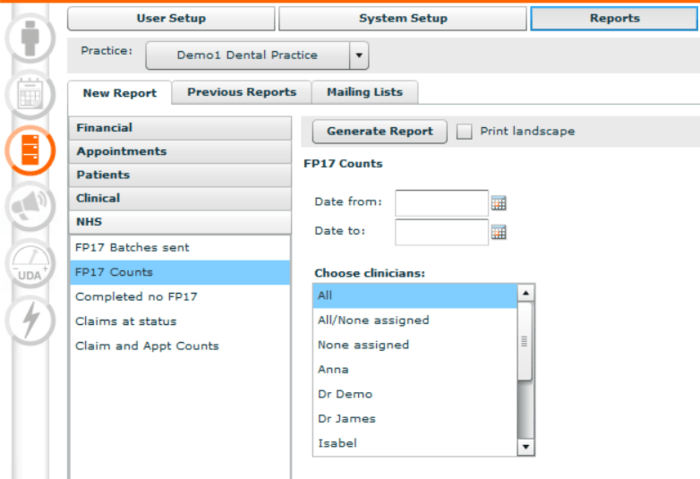
- FP17 Batches Sent - displays a list of NHS batches sent. Select dates and create a report.
- FP17 Counts - keeps track of the FP17 counts. This report allows the selection of specific clinicians.
- Completed No FP17- The report displays treatments that have been finished and do not have FPT17.
- Claims at status - displays a list of claims with a specific status: Incomplete, Error, Schedule completed, Schedule Problem.
- Claim and Appt Counts report - The report shows the number of FP17 forms submitted and completed appointments per month.
***: To select multiple clinicians on the keyboard hold down CTRL and then click the appropriate clinicians.