Reminders serve as an effective tool to help patients remember about their upcoming appointments and minimise instances of failure to attend. DentalPlus allows scheduling automated or manual reminders and delivers them through email, SMS, or post based on the patient's preferences.
¶ Text Reminders
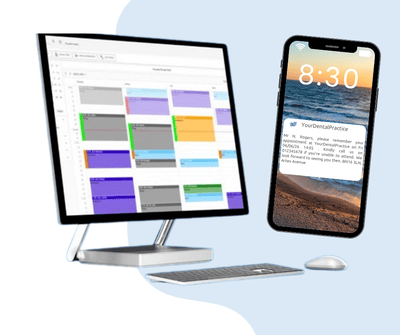
~ Keeping a dental practice running smoothly requires juggling schedules, patient expectations, and administrative tasks—all while ensuring a high level of patient care. One of the simplest yet most impactful tools you can implement is an automated system of text reminders.
~ Text reminders save time for staff. Manually calling every patient to confirm appointments consumes valuable administrative hours—time that could be better spent on other critical tasks (billing, chart updates, follow-up calls). By automating text reminders, a front-desk team no longer needs to dial out individually; instead, you set up a template and let the system deliver reminders at scheduled intervals.
~ Text reminders decrease failed attendance and cut no-shows significantly (often by 20–40%), directly boosting the practice’s revenue and ensuring a full schedule.
~Text reminders confirm visit. When patients reply “YES” to confirm via text, they’re more likely to perceive the appointment as a personal commitment. The simple act of replying reinforces accountability and significantly reduces the likelihood that they’ll forget.
~Text reminders increase revenue by minimising “Last-Minute” Cancellations: When patients receive a reminder well in advance, they have time to reschedule if something comes up proactively. This allows your practice to fill that time slot with another patient rather than leaving it empty or scrambling for a replacement at the last minute.
Unlike emails (which can get buried) or phone calls (which can be missed or placed on voicemail), texts land directly in a patient’s pocket. They are read within minutes—ensuring your reminder is actually seen.
How to start with text reminders? Please contact us at dentalplus.support@admor.co.uk, and we will send you all the necessary information.
¶ Email reminders
All modern life revolves around phones and computers, and patients are accustomed to checking email, reading messages, and responding daily—so incorporating timely email reminders into your practice’s communication strategy can have a significant positive impact on appointment attendance and overall patient engagement.
- Email reminders offer a simple, cost-effective solution to reduce no-shows. When patients receive a timely reminder in their inbox (typically 48–72 hours before the appointment), they are far more likely to remember and either confirm or reschedule in advance.
- Email reminders enhance patient satisfaction, as many prefer checking email over answering phones at an inconvenient time or returning missed calls.
- Emails save time. They can include attachments or links to online forms that patients can complete before their appointment.
Every email reminder is an opportunity to reinforce your practice’s brand. You can embed brief educational content—such as tips on maintaining oral hygiene or information about new services—which can increase patient engagement and perceived value.
How to start with email reminders? Please contact us at dentalplus.support@admor.co.uk, and we will send you all instructions.
¶ Best practices for Reminders
- Choose the right reminder channels: Text Messages (SMS) - High open rate, ideal for short reminders. Emails - Good for detailed messages like pre-appointment instructions.
- Respect patient preferences. Ask patients how they prefer to receive reminders and how frequently.
- Schedule multiple reminders: Send an initial email reminder 5–7 days before, then a follow-up text reminder 24–48 hours before the appointment.
- Autoconfirm provisional appointments: after the patient responds YES to your SMS, the appointment status switches from provisional to booked.
- Personalise a message with mailmerge fields and document templates.
- Be concise for text reminders: Keep messages short—no more than 160 characters if possible. A clear date, time, and brief instructions. 160 characters require one credit, which costs from 8p. More characters mean multiple credits will be used.
¶ Auto reminders
Automated reminders allow you to send messages to numerous patients at once, without having to open each patient's record individually. The system allows for the quick and effective transmission of reminders and notifications with a single click, typically running in the background.
There are 2 options for sending auto-reminders.
¶ ‘Clock’ Icon in the Appointment Book
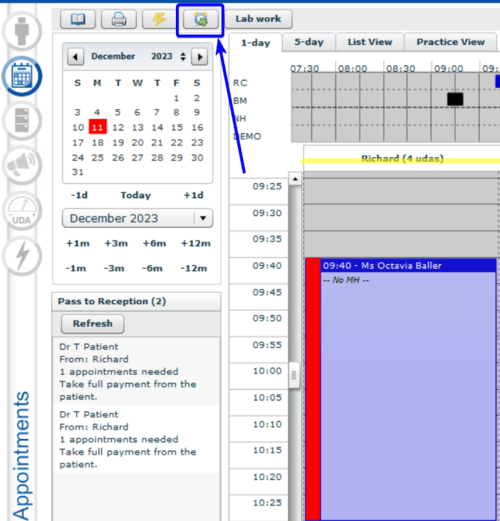
1) Single left-click on the “Send reminders” icon in the Appointment Book toolbar.
2) A pop-up "Automatic Reminders" displays, telling you that reminders will be sent until a specific date.
3) There is an option to change documents to be sent in the drop-downs “Email Doc” and “SMS Doc”.
Read more about how to create reminder templates…
4) If you need to adjust the days ahead, navigate to Admin → System Setup → Auto Comms. Read more…
5) Click ‘Send’
.png)
¶ Windows task scheduler
Auto reminders can be configured as a Windows scheduled activity. Simply tell us what time the reminders should be sent and how many days before the appointment, and we will set up the system to work automatically every day. Call support on 01903 899933 or email to set up automatic reminders.
¶ Has an auto reminder been sent?
When a reminder has been sent, a corresponding icon appears in the appointment book.
If the reminder has been sent by text, a phone icon will be displayed in the appointment status bar.

If the reminder has been sent via email, the status is represented by an envelope icon.

All reminders are stored in the Patient Record → Communications section.
.png)
¶ Reminder templates
Dental appointment reminder templates are pre-written messages—typically sent via text or email—that notify patients about their upcoming visits. They play a key role in reducing no-shows and keeping patients consistent with their oral care. These templates are easily customisable, allowing dental practices to send timely, professional reminders with minimal effort.
Read more about how to create reminder templates…
¶ Manual reminders
A manual reminder can be sent to the patient via:
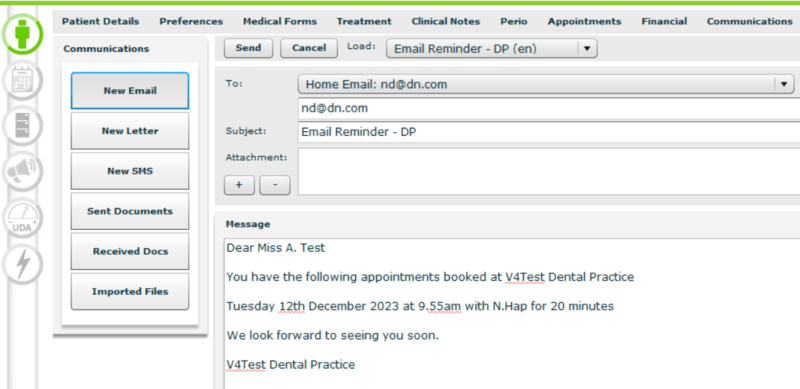
¶ Communications in the Patient Record
- Navigate to Patient Record → Communications
- Click ‘New email’ or ‘New SMS’
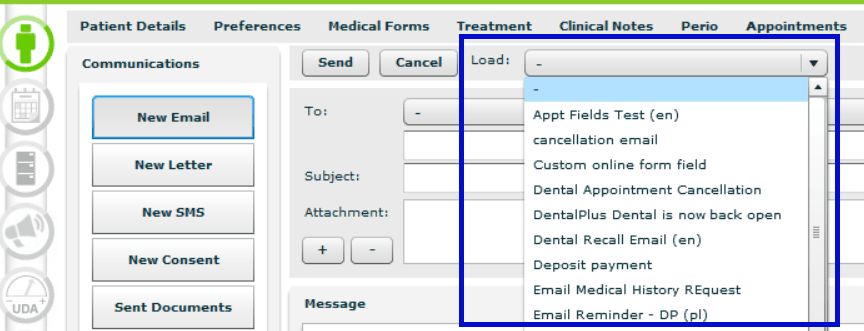
- Load the reminder document template in the ‘Load’ drop-down
- Select or enter the patient's email/phone number
- Amend the message, if necessary
- Click ‘Send’
¶ Appointments in the Patient Record
- Navigate to Patient Record → Appointments
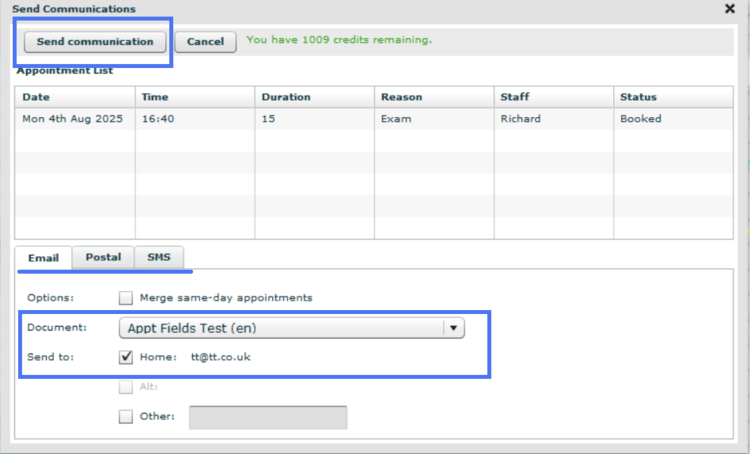
- Click ‘Send Comms’ button
- A pop-up appears allowing you to choose a way of communicating with a patient
- Click on the tab Email / Postal / SMS . If you choose ‘Postal', the system generates a PDF. file and opens it in a default web browser. Afterwards, it can be printed and sent via post.
- Load the document template in the ‘Load’ drop-down
Read more about how to create a reminder templates…
- You can merge the same-day appointments by ticking the ‘Options’ box.
- Click ‘Send’
.png)
¶ New Appointment in the Appointment book
- Right-click in the Appointment Book to create a new appointment.
- Enter the patient’s details and tick the ‘Print reminder’ checkbox before saving.
- Select the desired reminder type and document template, then click ‘Send’ to issue the reminder.