Patient feedback is a valuable tool for dental practices to identify areas for improvement and enhance patient satisfaction. By understanding what patients appreciate and dislike about their care, dental practices can make necessary adjustments to improve their services and meet patient needs.

Gathering patient feedback can be effectively done through various methods:
- Online Surveys: Utilize tools like Google Forms or SurveyMonkey to create and distribute surveys via email or your practice’s website.
- In-Person Questionnaires: Provide digital questionnaires at the end of appointments for immediate feedback.
- Follow-Up Emails: Send automated follow-up emails after appointments, asking patients to share their experiences and suggestions.
- Social Media and Review Platforms: Encourage patients to leave reviews on platforms like Facebook, Google Maps, or healthcare-specific review sites.
By using these methods, you can gather comprehensive feedback to continually improve your practice.
¶ Online surveys with Google Forms
Online patient surveys can be completed in three steps: create a Google Form, set a document template in DentalPlus, send a communication and collect responses. Let us look into each of them.
¶ 1) How to create a Google Form Questionnaire
- Sign in to Google Forms: Go to the Google Forms website (forms.google.com) and sign in with your Google account or create one.
- Start a New Form: Click on the "+" sign to create a new form.
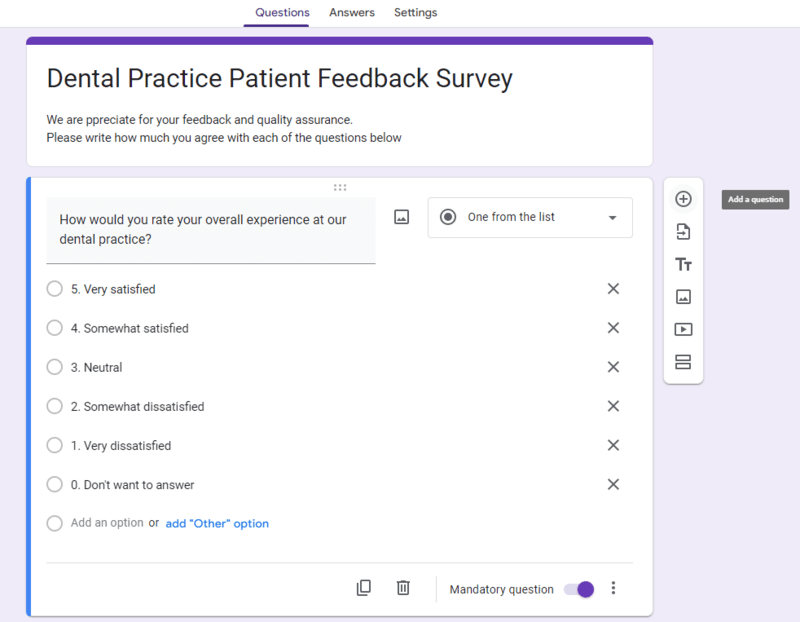
- Give Your Survey a Title: Enter a survey title, such as "Dental Practice Patient Feedback Survey"
- Add Questions: Add questions to your survey by using ‘+’ icon. You can find more information in the documentation (Google Docs help)
Here is a form with the sample questions: Please click here.
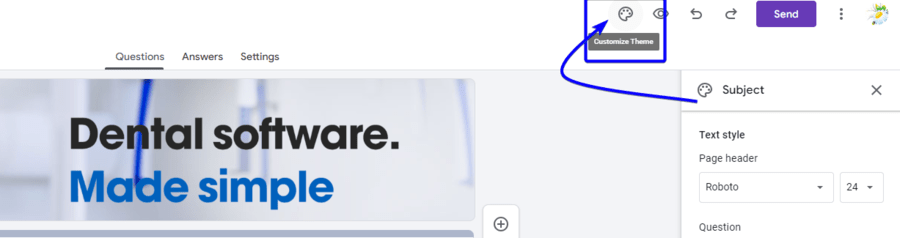
5. Customize Your Questionnaire: Change the theme and design of your survey to match your dental practice's branding or style preferences.
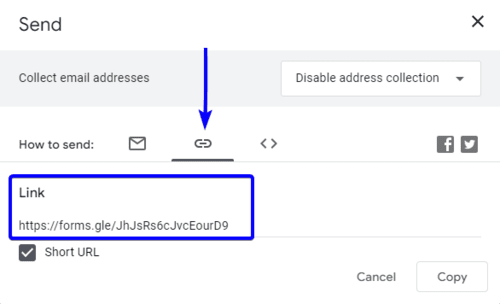
6. Share Your Survey: Once you're satisfied with your survey, click on the "Send" button to get a shareable link.
After that, you may share this link with your patients via DentalPlus Communications, Exit Communications, or Bulk Mailing. Simply put it into the document you're sending.
¶ 2) How to set a document template in DentalPlus
A Google Form questionnaire is ready for usage. You can send this link to every patient who quits the practice and ask them to complete the form.
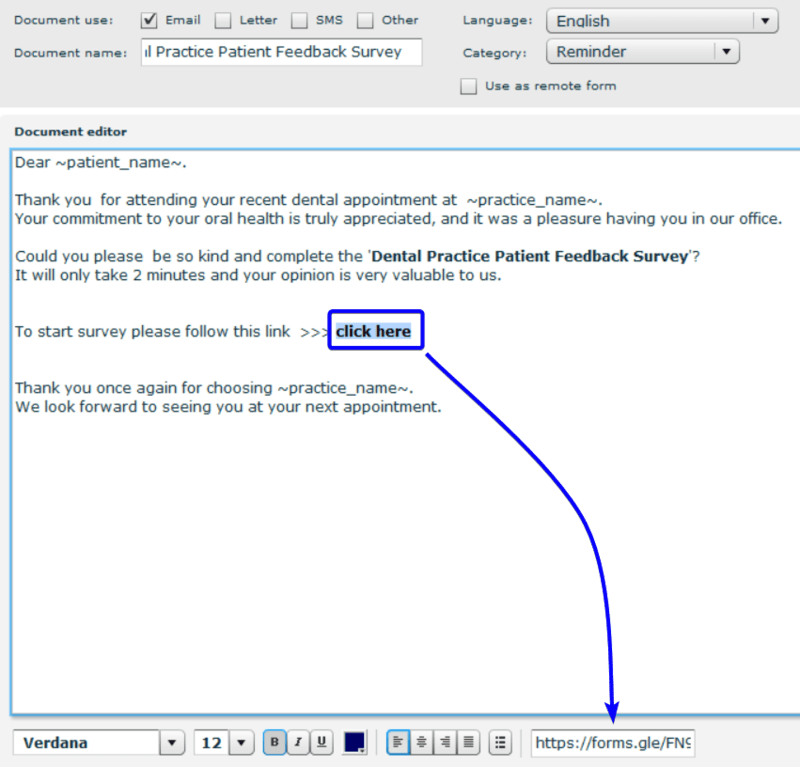
- Create an email template in the Admin section→ Documents. More information can be found by following this link >>>>
- Make the survey link clickable by copying and pasting the web address of the Google form into a designated field at the bottom of the DentalPlus screen. More information can be found by following this link >>>
¶ 3) Send a feedback communication
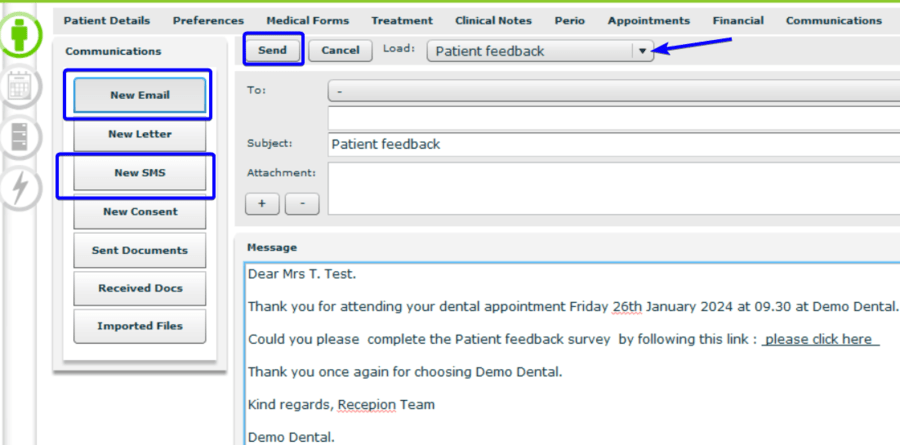
1. Navigate to the Patient Record → Communications section
2. Click on the ‘New Email’ or ‘New SMS’
3. Choose the appropriate template from the ‘Load’ dropdown and click ‘Send’
¶ 4) How to collect Patient responses
As soon as patients complete the survey, their replies are instantly collected and organised in Google Forms. You may view and analyse the responses in real-time by going to the "Responses" tab in Google Forms.

¶ In-Person Questionnaires
You can set up digital questionnaires at the end of appointments to provide rapid feedback.
1. Send a ‘Feedback email’ to your practice email.
2. Open it in any email client on the tablet at the reception desk
2. Click the link and encourage patients to complete this form immediately.
¶ Follow-up emails with Exit Communications feature
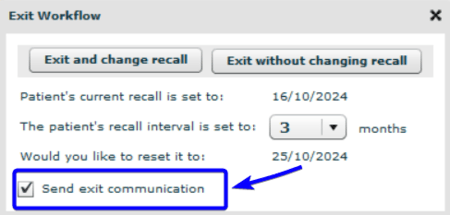
You can send an automatic follow-up communication to specific patients of your choice using the "Send exit communication" feature. This communication may include any feedback option.
- First of all, right-click on the appointment and select ‘ Exited Practice’
- Tick ‘Send exit communication’
- Click any of ‘Exit…’ buttons
- All sent communications are saved in the Patient Record → Communications → Sent Documents. Here you may find information about this communication, such as the date and time it was sent. Double-click the description to see the text.
.png)
¶ How to set ‘Send exit communication’ documents
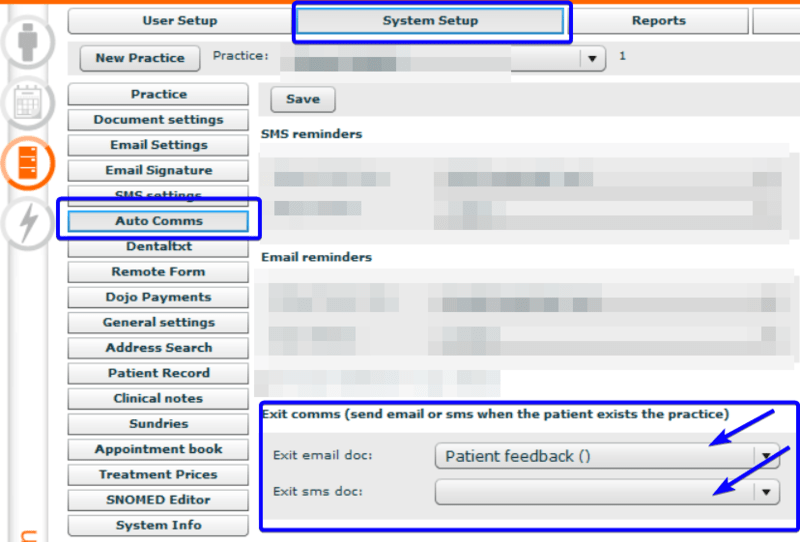
The system sends an email or SMS as ‘Exit communication’ using a preset template.
You can review and choose a document template in the Admin→System Setup→Auto Comms→ Exit comms.
- Simply select templates from drop-down menus and click ‘Save’.
- You can configure both email and SMS documents, and a patient will only get emails if their email address is entered in the Patient information.
- SMS will be sent to patients whose contact information only includes mobile phone numbers.
¶ How to create ‘Exit comms’ templates
You can create an ‘Exit Communications’ template in the Admin→Documents.
- Click ‘New document’. Click here for more information
- Tick ‘Email’ or ‘SMS’ in the ‘Documents use’ field.
- Add the document name and text.
- Don't forget to include an external link to the survey in Google Forms, review in Google Maps, on your website, etc. You can find a help-article about creating clickable links in the templates.
As an example:
Dear ~patient_name~.
Thank you for attending your dental appointment ~previous_appointment~ at ~practice_name~
Could you please complete the Patient feedback survey by following this link : please click here
Thank you once again for choosing ~practice_name~
Kind regards, Recepion Team
~practice_name~
¶ Social Media and Review Platforms
You can encourage patients to leave reviews on platforms like Facebook, Google Maps, or healthcare-specific review sites by sending them SMS or email communications.
- What you need to do is create a document template with an active link to this resource in Admin→Documents, as we discussed earlier
- Create a new email or SMS in Patient Record → Communications
- Choose the appropriate template from the ‘Load’ dropdown
- Click ‘Send’
***. The results of surveys or reviews can be viewed on the platforms you use to conduct them, such as Google Forms, Google Maps, Facebook, etc.